0%

什么是async

async函数是使用async关键字声明的函数

async函数是AsyncFunction构造函数的实例, 并且其中允许使用await关键字。async和await关键字让我们可以用一种更简洁的方式写出基于Promise的异步行为,而无需刻意地链式调用promise。 

  • promise作为返回值
1
2
3
4
5
6
7
async function func() {
return new Promise(resolve => resolve(1))
}
func()
// Promise {<fulfilled>: 1}
// func().then(res => console.log(res))
// 1
  • 非promise作为返回值
1
2
3
4
5
6
7
async function func1() {
return 0
}
func1()
// Promise {<fulfilled>: 0}
// func1().then(res => console.log(res))
// 0

上面示例可以得出以下结论:

  1. 如果async关键字函数显式地返回promise,那就以你返回的promise为准
  2. 如果async关键字函数返回的不是promise,会自动用Promise.resolve()包装

与promise的对比

先定义一个 Fetch 方法用于获取 github user 的信息

假定:foo1方法依赖于fetchUser,foo2方法依赖于foo1。

1
2
3
4
5
6
7
8
9
10
11
12
13
14
15
16
17
18
function fetchUser() {
return new Promise((resolve, reject) => {
fetch('https://api.github.com/users/mingyangya')
.then((data) => {
resolve(data.json())
}, (error) => {
reject(error)
})
})
}
// 依赖于 fetchUser
function foo1 () {
return new Promise(resolve => resolve('foo1'))
}
// 依赖于 foo1
function foo2 () {
return new Promise(resolve => resolve('foo2'))
}
  • promise方式

    1
    2
    3
    4
    5
    6
    7
    8
    9
    10
    11
    12
    13
    14
    15
    16
    17
    18
    19
    20
    21
    22
    // promise 
    function getUserByPromise() {
    fetchUser()
    .then((data) => {
    //todo soming
    console.log(data)
    foo1()
    .then(res1 => {
    // todo soming
    console.log(res1)
    foo2()
    .then(res2 => {
    // todo soming
    console.log(res2)
    })
    })
    }, (error) => {
    console.log(error)
    })
    }

    getUserByPromise()

    Promise 的方式虽然解决了 callback hell,但是这种方式充满了 Promise的 then() 方法,如果处理流程复杂的话,整段代码将充满 then。语义化不明显,代码流程不能很好的表示执行流程。

  • async方式

1
2
3
4
5
6
7
8
9
10
11
12
13
14
// async
async function getUserByAsync(){
let user = await fetchUser()
// todo soming
console.log(user)
const foo1Result = await foo1()
// todo soming
console.log(foo1Result)
const foo2Result = await foo2()
// todo soming
console.log(foo2Result)
}

getUserByAsync()

async 函数完美的解决了上面方式的问题。流程清晰,直观、语义明显。操作异步流程就如同操作同步流程。

async 函数的错误处理

async定义的函数内部会默认返回一个promise对象,如果函数内部抛出异常或者是返回reject,都会使函数的promise状态为失败reject。无法实现预期的效果。故而需要处理相应的错误。

使async函数判定失败reject的场景

  1. 内部含有含有直接使用并且未声明的变量或者函数。

    1
    2
    3
    4
    5
    6
    7
    8
    9
    10
    11
    12
    13
    14
    15
    16
    async function errorFun1 () {
    const foo1Result = await foo3()
    console.log(foo1Result)
    // console.log(foo10())
    return a
    }

    errorFun1()
    .then(res => {
    console.log('success:', res)
    })
    .catch(err => {
    console.log('fail:', err)
    // fail: ReferenceError: a is not defined
    // at errorFun1 (index.js:63)
    })
  2. 内部抛出一个错误throw new Error或者返回reject状态return Promise.reject(‘执行失败’)

1
2
3
4
5
6
7
async function PromiseError() {    
return Promise.reject('has Promise Error');
}

PromiseError()
.then(success => console.log('成功', success))
.catch(error => console.log('失败', error)) // 失败 has Promise Error
  1. 函数方法执行出错(Object使用push())
1
2
3
4
5
6
7
8
9
10
11
12
13
14
async function errorFun2 () {
const student = {}
student.push(1)
return student
}

errorFun2()
.then(res => {
console.log('success:', res)
})
.catch(err => {
console.log('fail:', err)
// fail: TypeError: student.psuh is not a function
})

…等等

处理方案

可以用try/catch,遇到函数的时候,可以将错误抛出,并且继续往下执行。

改造一下上面的错误,使其得到预期的结果

1
2
3
4
5
6
7
8
9
10
11
12
13
14
15
16
17
18
19
20
21
22
23
24
25
26
27
28
29
30
31
32
33
34
35
36
37
38
39
40
41
42
43
44
45
46
47
async function errorFun1 () {
try {
console.log(foo10())
} catch(err) {
console.log('err')
}

try {
return a
} catch(err) {
return 'catch error '
}
}

errorFun1()
.then(res => {
console.log('success:', res) // success: catch error
})
.catch(err => {
console.log('fail:', err)
})

async function PromiseError() {
return Promise.resolve('catch error')
}

PromiseError()
.then(success => console.log('成功', success)) // 成功 catch error
.catch(error => console.log('失败', error))

async function errorFun2 () {
const student = {}
try {
student.push(1)
} catch(err) {
// todo soming
}
return student
}

errorFun2()
.then(res => {
console.log('success:', res) // success: {}
})
.catch(err => {
console.log('fail:', err)
})

测试一下

1
2
3
4
5
6
7
8
9
10
11
12
13
14
15
16
17
18
19
20
21
22
23
24
25
26
async function async1() {
console.log("async1 start")
await async2()
console.log("async1 end")
}

async function async2() {
console.log("async2")
}

console.log("script start")

setTimeout(function() {
console.log("setTimeout")
}, 0)

async1()

new Promise(function(resolve) {
console.log("promise1")
resolve()
}).then(function() {
console.log("promise2")
})

console.log("script end")

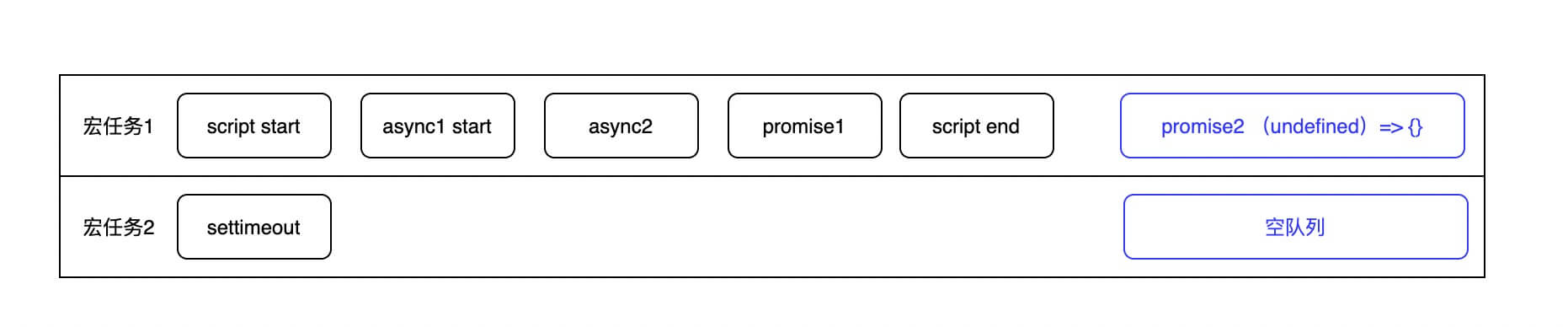
事件执行顺序:

  • macro-task(宏任务):包括整体代码script,setTimeout,setInterval
  • micro-task(微任务):Promise,process.nextTick

    示意图:

    示意图

执行结果:

1
2
3
4
5
6
7
8
9
10
11
12
13
14
15
script start

async1 start

async2

promise1

script end

async1 end

promise2

setTimeout

相关链接: